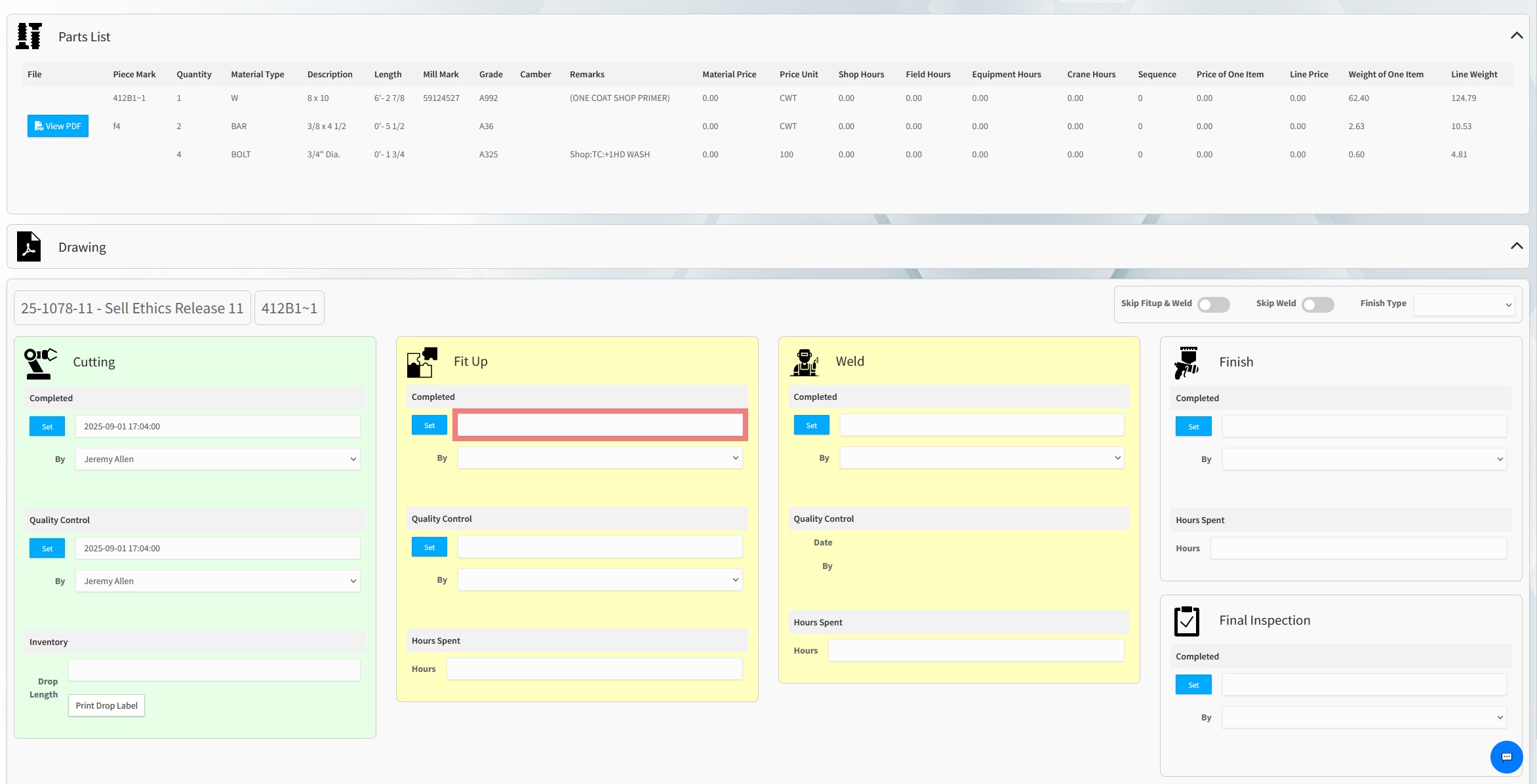
Klyrvüe is built to make the workday easier on the shop floor. Instead of hunting through binders or walking to the office for prints, workers get the drawings they need instantly—right on a tablet or kiosk by simply scanning a QR code. Every member’s details, parts, weld notes, and revisions are right there with no delay, smudges, or outdated paper. When a task is finished, updating the stage is just one tap, automatically time-stamped and recorded without extra paperwork.
And now they get more than a flat print. Klyrvüe includes a built-in 3D model viewer that runs in the browser on office computers and shop-floor tablets alike. Pull up the entire project model to see how the job goes together, or open the 3D model of the single member in front of you and turn it over until the connection makes sense. Drag to rotate, scroll or pinch to zoom, and reset the view with one tap — no CAD license, no plugin, no file to download.
The system also gives workers clarity about what’s next. Each member shows its current stage and the upcoming step in the process, so there’s no guessing, backtracking, or waiting on instructions. This speeds up production, reduces mistakes, and eliminates wasted movement. With Klyrvüe, the shop stays organized and workers stay focused on fabrication, not chasing information or filling out forms. It’s faster, cleaner, and built for how real fabrication work actually happens.
3D Viewing Of The Whole Project Model
Load the full project model in the browser and orbit, pan, and zoom through the entire structure. Estimators, PMs, and foremen can see how the job assembles before a single piece is cut — on any computer, no CAD seat needed.
Streamlined Project Management
Keep all project details, pricings, and updates in one place, ensuring that deadlines are met and resources are optimized.
Real-Time Progress Tracking
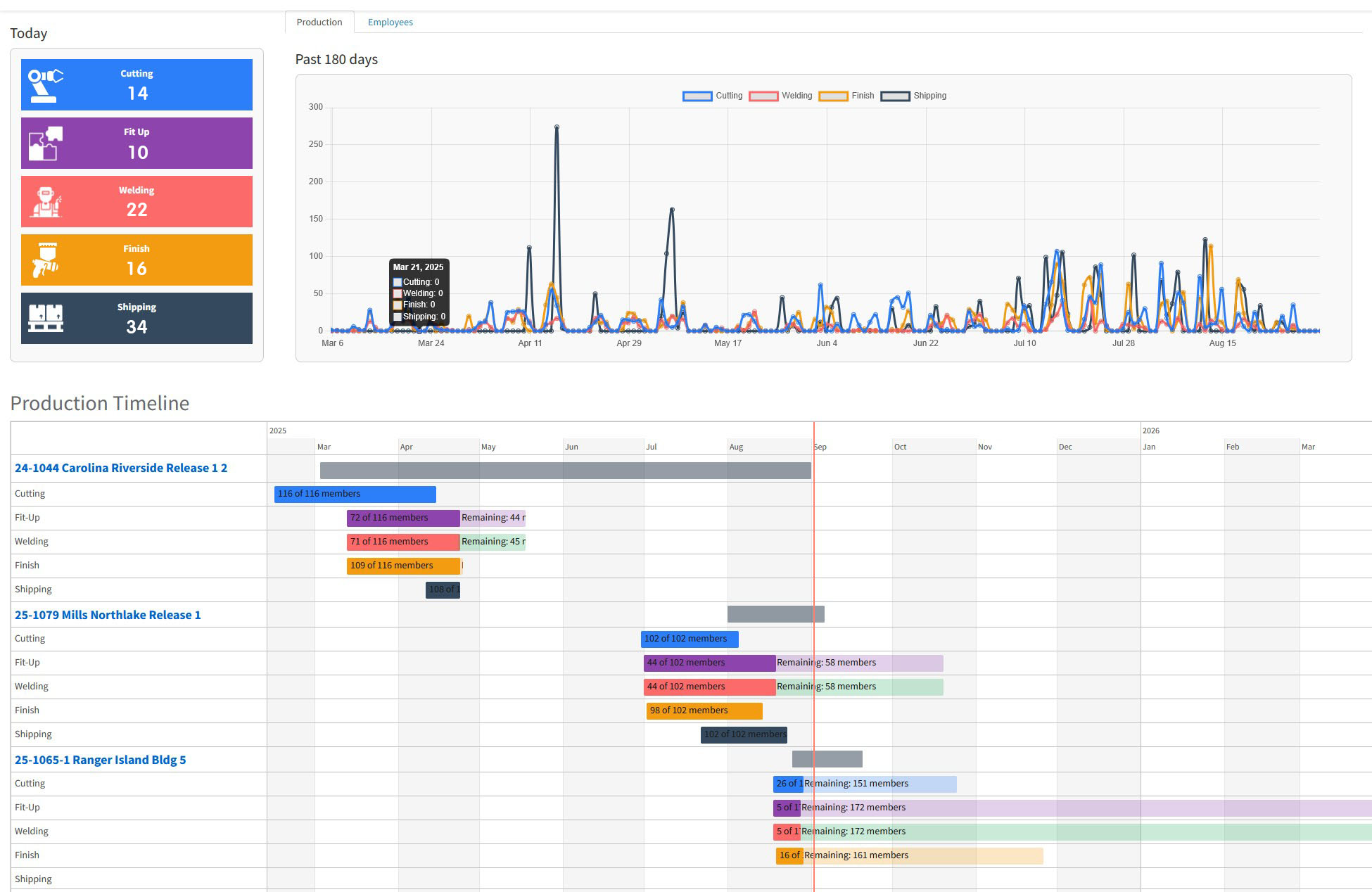
Monitor each stage of production, from cutting to finishing, with instant updates and visual dashboards for better decision-making.
Smart Resource & Time Tracking
Track labor hours, machine use, and material costs to control budgets and maximize efficiency across projects.
3D Of Every Individual Member — On A Tablet
Scan a member’s QR code at the station and its own 3D model opens on the tablet. One finger orbits it, two fingers pinch to zoom. Welders and fitters can look at the actual geometry of the piece in their hands instead of squinting at a section detail.
Integrated Shipping & Logistics
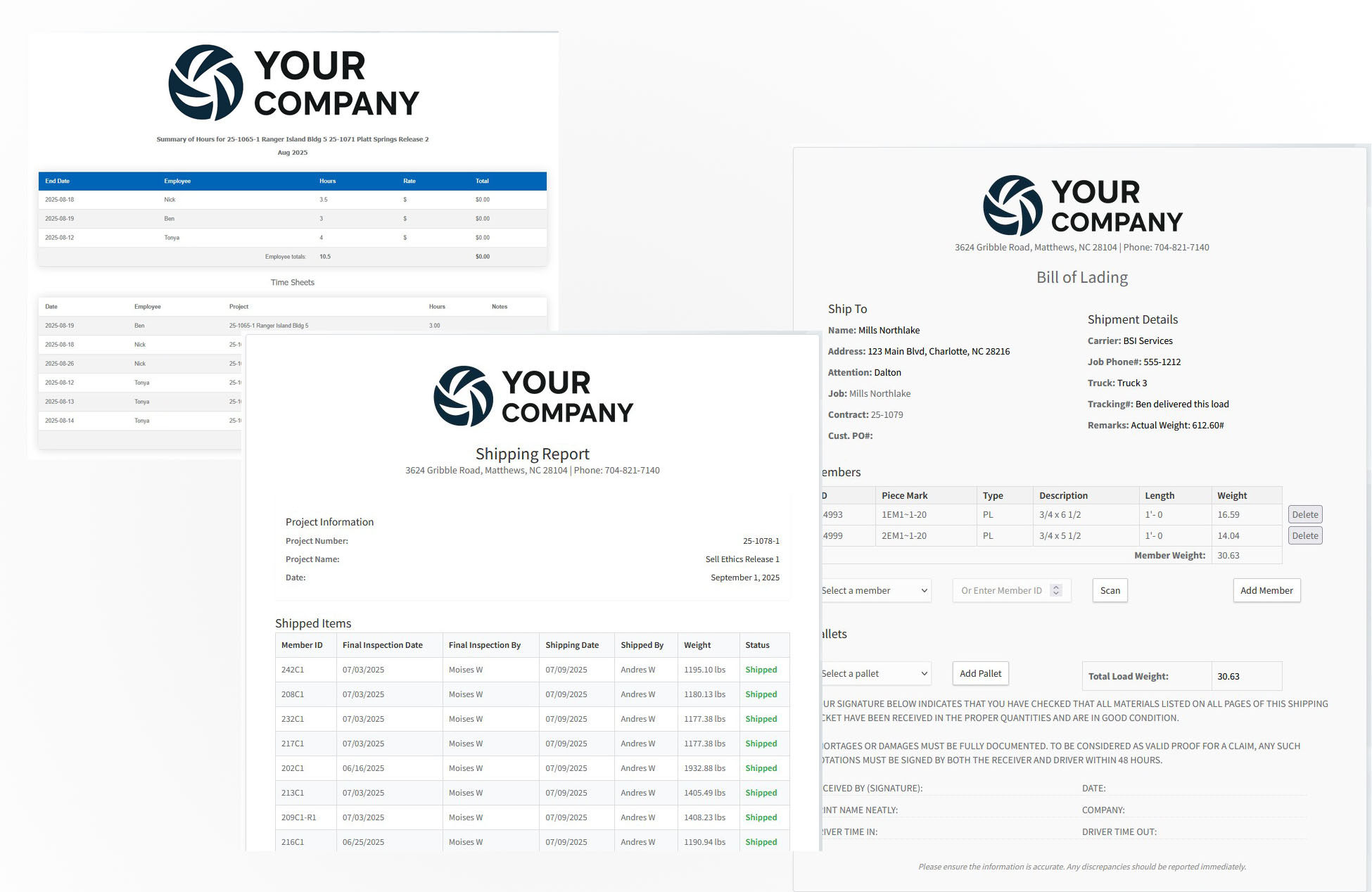
Simplify shipping with barcode scanning for bills of lading, automated reports, and accurate delivery tracking.
Seamless Team Collaboration
Workers, supervisors, and managers can access the same system to view updates, upload drawings, and log completed tasks, reducing communication delays.
Reports & Compliance
Generate detailed reports for audits, job costing, employee performance, and project status with just a few clicks.
Workshop Efficiency In Action
“During the certification review, the use of Klyrvue software stood out as a clear strength. Its ability to organize documentation, streamline inspection records, and provide transparent traceability greatly enhanced the efficiency and reliability of the audit process. This level of digital integration reflects a fabricator’s commitment to quality and compliance.” — Steel Fabrication Quality and Process Auditor.
Klyrvüe is the lightweight, cloud-based platform built for AISC-certified fabricators. Track every part, scan every weld, capture every hour — and put the 3D model of the whole project, and of every single member, in the hands of the people building it.
Don’t imagine it — watch it. This is Klyrvüe running in a real shop environment.
See The Steel In 3D — Before You Ever Cut It
Flat prints only tell half the story. Klyrvüe now includes a built-in 3D model viewer — no CAD license, no plugin, no software to install, and nothing to download to the device. If it has a browser, it can turn the steel.
Both viewers below are live. Grab the project model and spin it; grab the member on the tablet and turn it over. This is the same viewer your crew would be using, running right here on this page.
Upload the project’s IFC file once. Klyrvüe reads it, builds a 3D model of the entire project, and automatically generates a separate 3D model for every single member in the job. From that moment on, the 3D view is just part of the record — sitting right next to the drawings, parts list, weld notes, and stage history everyone already uses.
Project 24-118 · Whole modelDrag to rotate · scroll to zoom · right-drag to pan
The whole project model — a real job, live in the browser. Drag it.
Member 403C1 · W10x30One finger to orbit · pinch to zoom
One member on a shop tablet — scanned at the station, turned by hand.
The Whole Project Model
Open the complete structure and orbit through it — columns, beams, stairs, platework, the lot. Understand sequencing and erection order without opening a CAD package or waiting on the detailer.
Every Individual Member
Klyrvüe builds a standalone 3D model for each member automatically. Open 403C1 on its own, spin it, and see the actual geometry of the piece — clips, plates, holes, and all — with nothing else in the way.
Built For Computers
In the office, the viewer fills the screen. Drag to rotate, scroll to zoom, shift-drag or right-drag to pan, one click to reset the view — and download the .glb if someone wants it in Blender or Windows 3D Viewer.
Built For Tablets
On the floor it is pure touch. One finger orbits the model, two fingers pinch to zoom. It runs on the same tablets your crew already carries — no app store, no install, no extra hardware.
From IFC File To The Shop Floor
1. Upload the IFCDrop the model onto the project page. One file, one time.
2. Klyrvüe splits itThe whole-project model is built, then a separate 3D model for every member in the job.
3. Scan at the stationA QR scan on the tablet opens that member — details, drawings, parts, and its 3D model.
4. Turn it and build itRotate, zoom, check the connection, tap the stage complete. Time-stamped, no paperwork.
The payoff is fewer questions and fewer mistakes. A fitter who can rotate the member sees the clip on the far side before it gets welded on the wrong face. A foreman who can spin the project model can explain the erection sequence in thirty seconds instead of unrolling a print on the hood of a truck. And a PM can answer a customer’s question from a phone call without tracking down the detailer.
It is the same 3D data the detailing office already produced — Klyrvüe just makes it usable by everyone who touches the steel.
Have complete control over your fabrication projects, from the shop floor to delivery. You can see every detail of your projects, track progress in real time, update work stages instantly, and generate accurate reports. Whether it’s managing members, uploading drawings, or building bills of lading with a simple barcode scan, everything is designed to make your operations smoother, faster, and more efficient.
Klyrvüe brings your fabrication floor and office together in one unified portal. From mill‑mark to fit‑up, weld, finish and erection—every part, every step and every sign‑off is recorded.
With real‑time visibility and document‑ready reports, Klyrvüe helps you enforce the rigorous process discipline required by industry standards for structural steel fabricators.
Assign work and track status (cutting → fit‑up → weld → finish)
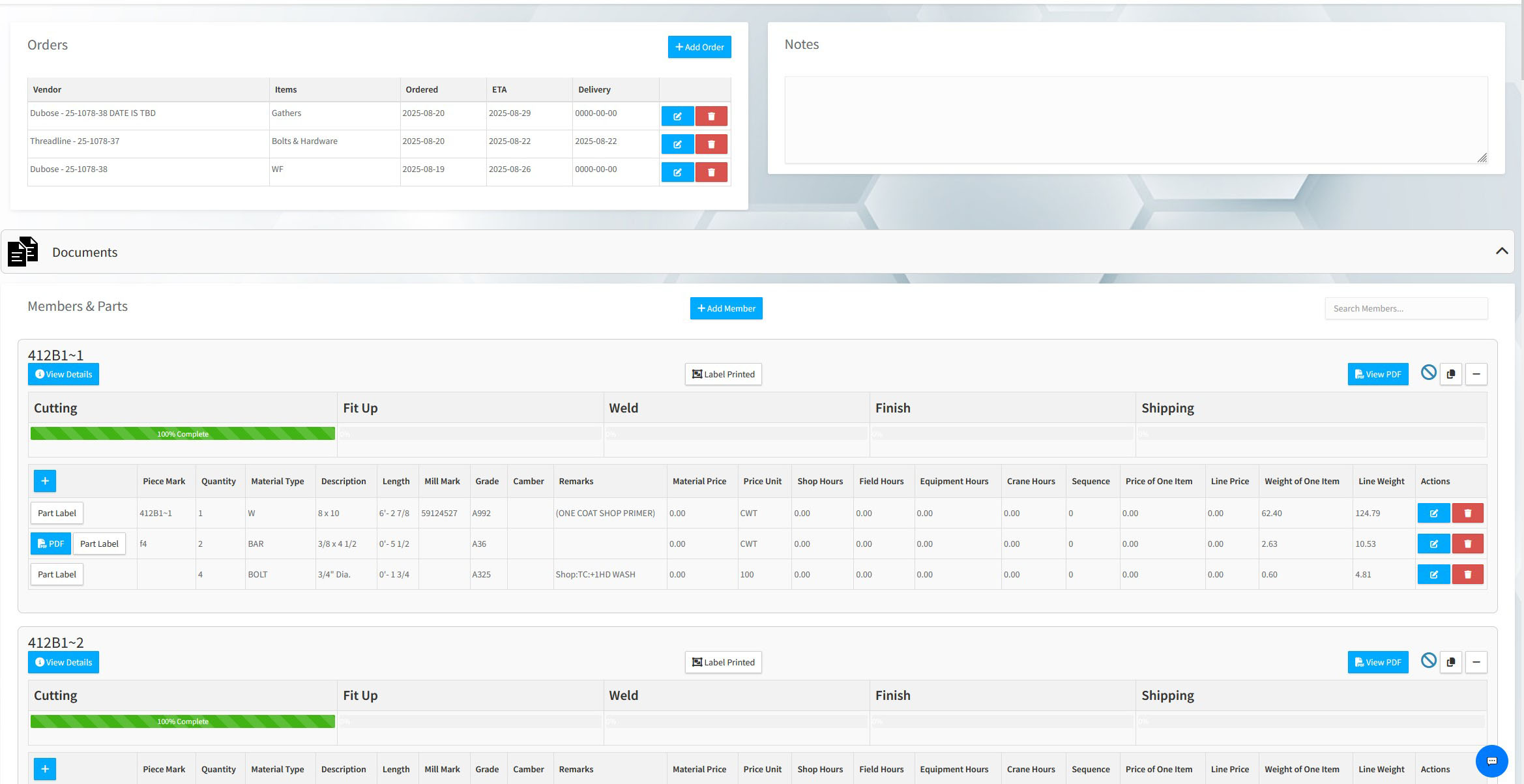
Link member assemblies, parts, QR/Barcode labels and 3D models
View the whole project model in 3D — orbit, pan and zoom the full structure in the browser
View any individual member in 3D on a computer or a shop-floor tablet, straight from a QR scan
Upload and manage weld procedure specs, welder certifications, nondestructive testing results and inspection sign‑offs
Generate audit‑ready traceability logs, weigh sheets and member summaries with a click
Whether you’re fabricating beams, stairs, railings or platework, Klyrvüe gives you the digital scaffolding to enforce quality workflows and stay ahead of compliance requirements.
Your data is all in one place on a clear, intuitive dashboard. You will be able to see project progress, team assignments, and key metrics at a glance, quickly spot bottlenecks, and make informed decisions—keeping your operations efficient and on track..
Simple member tracking
Workers will be able to update their progress effortlessly. By simply scanning a QR code with a tablet, they can mark a work stage as complete with a single click—automatically recording the time, date, and their name. This makes tracking work fast, accurate, and hassle-free.
3D models, project and member
Upload the project’s IFC once and Klyrvüe builds a 3D model of the entire structure plus a separate 3D model for every member in the job. Open the whole project on an office computer to walk the erection sequence, or scan a QR code at the station and turn that single member over on a tablet — one finger to orbit, pinch to zoom. No CAD license, no plugin, nothing to install. Need it elsewhere? Download the .glb with one click.
Easy access to project details
You will be able to see all project details in one place and easily manage every aspect of your work. You can upload and access drawings, track progress in real time, and edit parts or members directly—giving you full control and visibility over your projects.
Export reports
Generate detailed reports quickly and accurately. From work reports and audit reports to employee summaries, everything is organized for easy access. Bills of lading can be built instantly by scanning a barcode to add members, streamlining shipping and documentation so you always have reliable records at your fingertips.
Seamless End-to-End Workflow
Structural Material Manager (by E.J.E. Industries) has long been the industry-trusted system for turning engineering output into something a shop can act on. SMM excels at importing take-offs, generating BOMs, calculating weights and surface area, building cutting lists, optimizing nests, tracking inventory, and issuing shipping tickets. It is the smart “thinking engine” for the front half of steel and iron fabrication.
Klyrvüe picks up exactly where SMM leaves off — becoming the next operational link in the chain. Once SMM has generated lists, nests, and organized materials, Klyrvüe takes over at the execution layer:
Scan & track every part and assembly through cutting, fit-up, welding, finish, QC, and loading
Capture every weld, hour, and process step with real-time barcodes/QR scanning
Show live production status on dashboards — not after the job is done
Attach drawings, notes, and photos to ensure correct revisions on the floor
Turn the detailing office's IFC into 3D anyone can use — the whole project model and every individual member, on computers and tablets
Log shipping & delivery events with audit trails
Give managers real-time cloud-level visibility across all jobs
Together, they form a closed-loop workflow:
SMM handles the material, math, and nesting.
Klyrvüe handles the execution, traceability, and accountability.
Using both in sequence gives fabricators continuous visibility: Take-off → cut-list → shop floor → QC → truck → delivered.
Why Fabricators Pair Them
SMM Strength
Bill of Material management
Weight & surface-area calculations
Nesting & cut optimization
Inventory & shipping tickets
Front-of-shop planning
Klyrvüe Strength
3D viewing — whole model & per member
Real-time production tracking
Barcode/QR routing & scanning
Labor & weld traceability
Live dashboards & cloud reporting
Shop-floor execution & proof-of-work
Build Toward AISC Compliance With Klyrvüe
AISC Certification evaluates your company’s quality management system, including its procedures, people and records. For steel fabricators working toward certification, that means building consistent processes for document control, material identification, welding, inspection and quality records — and being able to show those processes at work.
Klyrvüe helps your team put those daily practices in place. Connect drawings, weld records, personnel qualifications and inspection results to the work happening on your floor. With production history and supporting documents organized in one place, your team can spend less time chasing paperwork and more time preparing for an AISC audit, addressing gaps and maintaining consistent quality as your company grows.
Whether you’re pursuing your first certification or preparing for a renewal audit, Klyrvüe supports the recordkeeping behind your AISC 207 quality management system. Explore AISC’s certification program and audit preparation resources to understand the requirements that apply to your company.
Turn Everyday Shop Activity Into Audit Preparation
AISC 207Document & drawing control
Keep drawings with the member and use QR scanning to give your team access to the uploaded revision on a tablet. This supports your document control procedures and helps reduce reliance on outdated paper copies.
AISC 207Control of quality records
Recorded stage changes capture the date, time and person responsible, helping your team retrieve production history and supporting records when reviewing a job or preparing for an audit.
AISC 207Material identification & traceability
Mill test reports and material documents are stored against the project and the assemblies they belong to, so tracing a piece mark back to its paperwork is a search, not an afternoon in the filing cabinet.
AISC 207Fabrication process control
Cutting, fit-up, welding, finishing and QC are recorded stage by stage as the piece moves. The routing isn’t a plan of how work was supposed to go — it’s the record of how it actually went.
AISC 207Welding procedures & welder qualification
WPSs, welder certifications and nondestructive testing results are uploaded and kept current, and each employee’s file holds their own qualifications — so “was this welder qualified for this weld on this date?” has an answer.
AISC 207Inspection & testing
Inspection sign-offs attach to the member they belong to, alongside the NDT results and the QC notes, in the order they happened.
AISC 207Training & personnel records
Employee files keep certifications and training documents in one place, with expiry visible before it becomes a finding rather than after.
AISC 207Internal audit & management review
Audit-ready reports, traceability logs and member summaries export in a few clicks, which gives your internal audits and management reviews something to actually review — real production data instead of anecdotes.
The auditors notice. As one steel fabrication quality and process auditor put it after a certification review, Klyrvüe’s ability to organize documentation, streamline inspection records and provide transparent traceability “greatly enhanced the efficiency and reliability of the audit process.”
Klyrvüe supports your certification preparation; certification depends on your company’s quality management system meeting applicable AISC requirements and completing the review and audit process. Your quality manual, procedures and qualified personnel remain essential. Klyrvüe is an independent product and is not affiliated with or endorsed by AISC.
Klyrvüe is built and priced for real mid-sized shops — not giant corporations. Instead of spending tens of thousands on heavy systems like Tekla PowerFab or STRUMIS, plus servers and consultants, you get the core tracking and visibility you actually need for a simple monthly subscription. No big upfront cost, no hardware, no long setup — just a clean, affordable, cloud-based system that replaces spreadsheets and guesswork without the enterprise price tag.
Unlike heavy, CAD-driven systems like Tekla PowerFab or STRUMIS, Klyrvüe is lean, cloud-native, and built for mid-sized fabricators — you still get the 3D model of the project and of every member, in a browser, without buying anyone a CAD seat.
“Finally — a tool my team isn’t complaining about.” — Eric, Owner, Watson Steel & Iron
“I’m impressed that my guys picked up Klyrvue right away. We went from greasy paper prints everywhere — and I mean hundreds of them — to tablets slung over shoulders, scanning to see what’s next. It’s a total shift in how the shop operates. My job costing is finally accurate, and project review meetings actually make sense. For the first time, production and management are aligned — we’re setting goals together instead of working against the clock.”
“I’m not chasing people for timesheets anymore — everything just flows.” — Sierra, Project Accounting
“With Klyrvue, I see real-time timesheets tied directly to active projects. I’m no longer chasing people down to ask what they worked on or whether it was billable. The data comes in clean, accurate, and ready for review. I simply approve the hours, and QuickBooks job costing does the rest. It’s streamlined our entire accounting workflow and made reporting effortless.”
“No more piles of dirty prints — everything is organized and electronic.” — Tonya, Production Assistant, Watson Steel & Iron
“My job is to load jobs from EJE, and with Klyrvue it’s rapid — just drag and drop the drawings and everything syncs instantly. Every single document is stored electronically, from MTRs to sign-offs. We finally have one central place for all project files and records. No more piles of dirty prints stacked around my office. And I don’t have to dig through paperwork to check if something’s signed by the right person anymore — it’s all right there on the screen.”
“Now I can see the whole process — who’s doing what, and where to focus next.” — Ben, Shop Foreman & Welding Lead, BSI Inc.
“As a shop foreman, I finally have visibility into everything that’s happening on the floor. I can see the right certified person doing the right job on the right project — and that the work’s getting done on time. Klyrvue shows me exactly where to shift resources to clear a bottleneck before it slows us down. It helps me balance manpower across stations in real time. It’s like having a force multiplier right when and where you need it. Klyrvue also helped us become AISC certified by keeping our weld records, welder qualifications and traceability documentation organized and ready for review.”
Request a Demonstration
See exactly how Klyrvüe would run your shop and discover where you can reclaim hours, stop bottlenecks, and capture costs with zero disruption. Sill in the form below or send an email to info@klyrvue.com